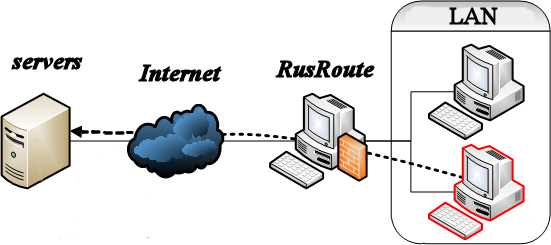
RusRoute firewall research project is flexible software IPv4 and IPv6 router and firewall, Internet gateway for Windows, it is the ideal solution for making Internet gateway for local area network (LAN) of small company, the users' traffic encountering and restricting, protection against of network attacks with functions of NAT, redirect, VPN server/client for corporate remote access, transparent proxy with port numbers saving, LAN to VPN Bridge, DHCP servers, FTP servers, multicast UDP proxies, HTTP caches, HTTP to HTTP proxy converter, captive portal feature, timed action and Splitters for rules, with advanced routing possibilities. RusRoute can also be used in firewall mode, not as a router, to protect game servers, for example.
The next functions are not supported: Captive Portal for https connections, multicast routing, https caching, content filtering, IPv6 VPN, VPN multicast.
Supported OS: Windows 10/11 x64, Server 2019 Standard or later, CPU: >= 3 cores, RAM: >= 8 GB.
RusRoute firewall is a system software, therefore you need to add the C:\RusRoute folder and the setup.exe to the Windows Defender antivirus exceptions to install it.
New in this version: + Added filtering based on the SNI (Server Name Indication) domain name transmitted at the start of HTTPS sessions (during connection establishment). + Added display of hostnames for HTTP and HTTPS protocols in the TCP connections window. - Fixed an issue in versions 3.5.6 and 3.5.7 that could lead to a deadlock when processing certain ICMPv6 packets. - Fixed an error in the checksum calculation for the initial TCPv6 SYN packet that caused a 1–3 second delay in establishing TCPv6 connections. + Switched to release-optimized versions of mutex-handling classes (the code is now noticeably more concise and slightly faster). + Switched to using constexpr string literals in the window application, which allowed removing some synchronized string initialization code. + Added preset anti-TCP-flood settings to the initial configuration files. + Various minor changes.
New in this version: + Optimized the pseudorandom number generation code. + Firewall stress-tested for TCP resource exhaustion during connection establishment.
New in this version: + Improved program stability. + Added anti-flood settings to filter data. + Added the ability to specify the VPN server identifier string parameter. - Minor bugs have been fixed, including the fix for the Apply button not working with the first time in tabbed windows. + Minor other changes.
To allow HTTP methods up to 9 characters long, specify "*********" in the filter settings, or list all allowed methods separated by a space. To allow FTP commands up to 4 characters long, specify "****" in the filter settings, or list all allowed commands separated by a space.
New in this version: + Separated IPv4 and IPv6 code at the data layer. This reduced memory consumption for IPv4 connections and fixed several bugs. - Fixed a bug with freeing TCP block structure memory while it was still in use. + Updated the resource cleanup/release function. Some resources are freed more dynamically. + Minor other changes.
New in this version: - Fixed several cases of resource leaks - TCP structures and mutex/lock order/synchronization errors that occurred under high loads when TCP returned errors when working with sockets and creating threads. + The resource cleanup/release function has been extensively reworked. Some resources are released more dynamically. + Increased the threshold for when NAT port identifiers are close to exhaustion to 15/16 of the range. + Separated IPv4 and IPv6 code at the function level. This improved protection against resource exhaustion. * The algorithm for generating TCP RST packets in the driver has been changed. - The 2.5 gbits/sec speed is now correctly displayed in the GUI application for adapters with this transfer rate. + Minor other changes.